Compare products without the twelve open tabs
Save a product page from any shop and Faved fills in the product details, such as the price, brand, rating and whether it is in stock. Every product lands in one table you can sort by price or rating, with your own pros, cons and verdict next to each.
- Shoppers comparing across shops
- Industry: Shopping
14-day free trial · No credit card · Cancel anytime
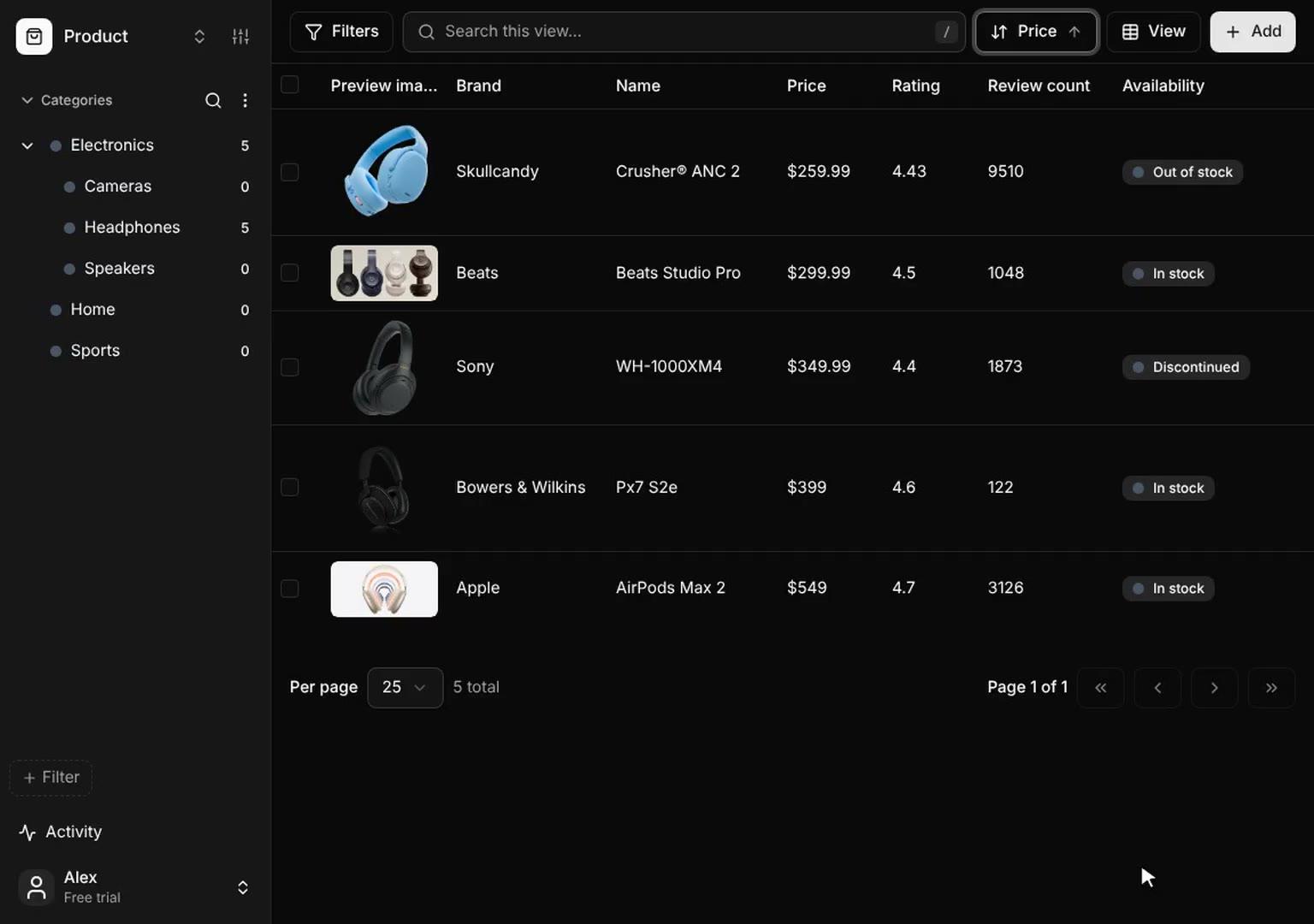
The 9 fields it starts with
- Name (Text)
- Price (Number)
- Currency (Text)
- Brand (Text)
- Rating (Number)
- Review count (Number)
- Availability (Pick one)
- Categories (Pick any)
- Screenshot (Screenshot)
Change any of them, and add your own.
The problem.
And a better way to work.
Comparing products means twelve open tabs, each shop showing the price, rating and stock in its own place. You copy numbers into a note or a sheet, and by the time you decide, a price has changed or an item is out of stock.
A product research workflow in Faved
- 1Save each product pageSave from any shop with the Chrome extension, the bookmarklet or your phone. Faved fills in the name, price, brand, rating, reviews and stock.
- 2Add what matters to youAdd fields such as Pros, Warranty or Bought.
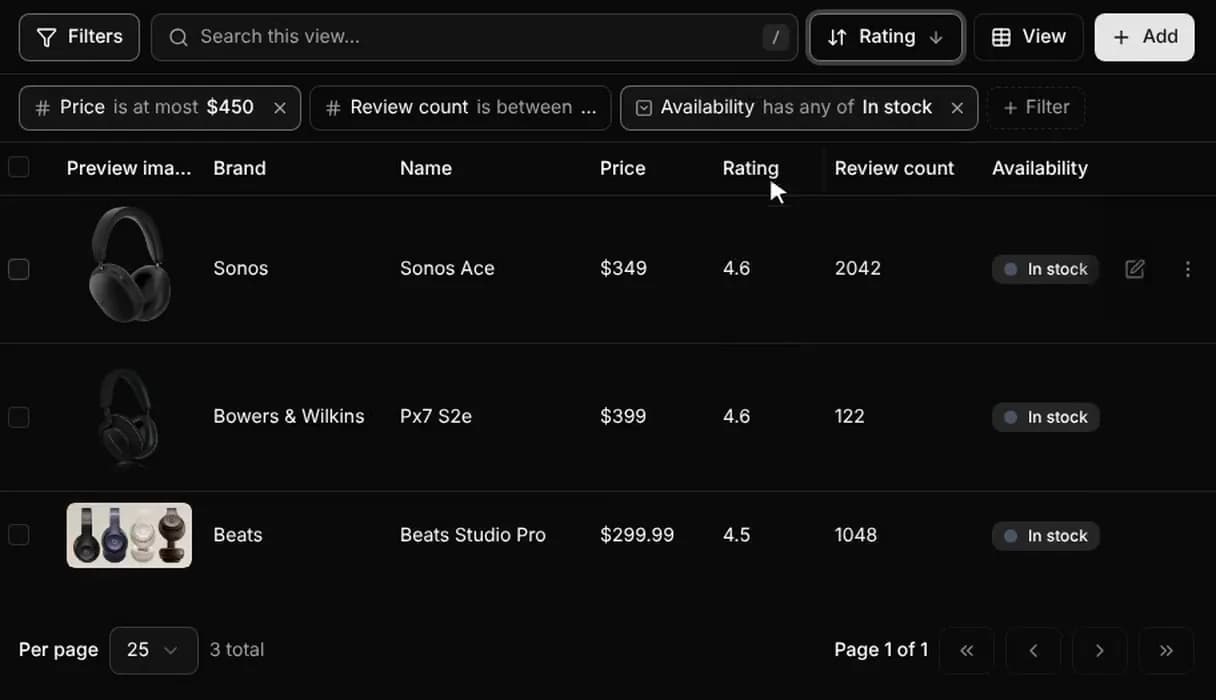
- 3Filter and sortFilter to your budget and In stock, and sort by rating to see the winner.
- 4Refresh before you buySelect the list and refresh it to pick up today’s prices.
How it works.
Three steps, no spreadsheet.
Save the page the way you already browse. Faved reads it, fills in the fields and adds it to one table with everything else you saved.
Read how Faved fills in fields →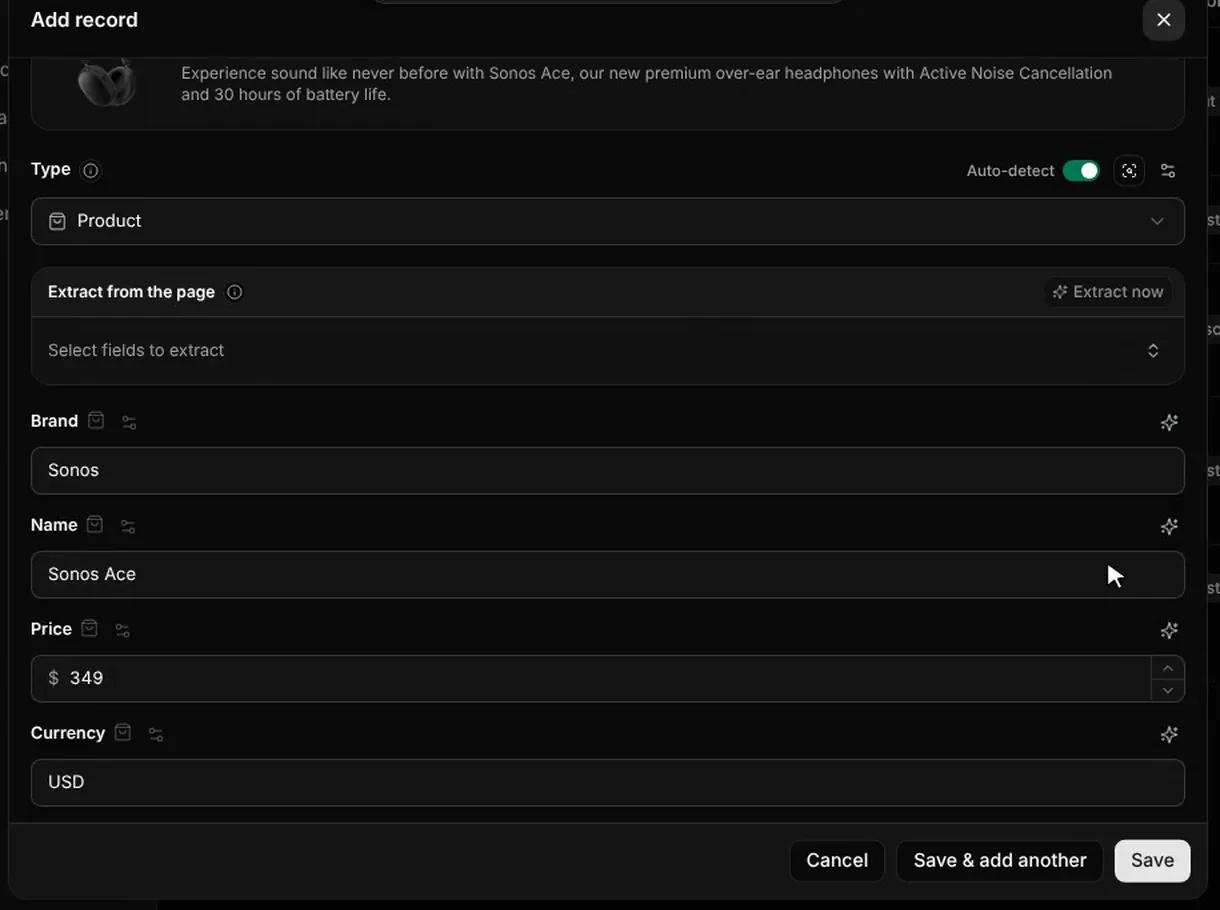
Features.
Built for product research.
The template starts with 9 fields, ready to sort and filter. Change any of them, and add the fields you need.
How fields work →Cheapest first, or best rated
Price and rating are numbers, so sorting works the way you expect. Filter to a price range and drop anything out of stock.
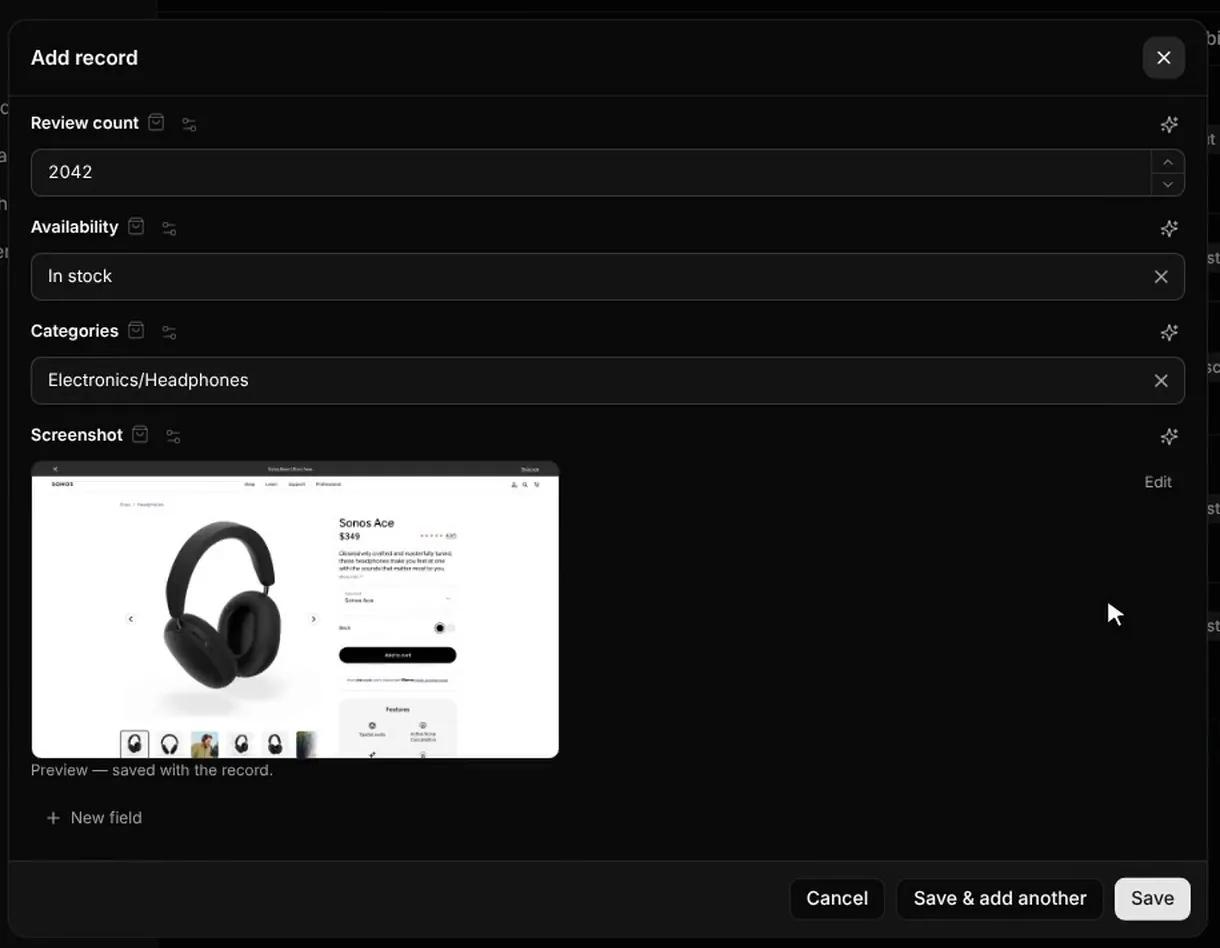
A screenshot of the page as it was
Prices change. Faved keeps a screenshot of the product page from the day you saved it, so you can see what it said.
Refresh a whole list in one go
Select every product in the table and refresh them. Faved re-reads each page in the background and updates its fields.
Pros, cons and bought
Add your own fields and fill them in as you compare, so the decision is written down next to the numbers.
Cards to choose
Switch to Cards to see each product with its image, price and rating.
How it compares.
Against what you use now.
Tabs and wishlists keep the products, but not side by side. A spreadsheet compares them, once you have typed every price in.
| Faved | Open tabs | Shop wishlists | Spreadsheet | |
|---|---|---|---|---|
| Product details filled in | Yes: From any shop | No: Read each tab | Yes: That shop only | No: Typed by hand |
| Every shop in one table | Yes: Built in | No: No | No: One shop each | Yes: If you build it |
| Sort by price or rating | Yes: Built in | No: No | Partly: Some shops | Yes: Built in |
| Screenshot of the page | Yes: Saved | No: No | No: No | No: No |
| Your pros, cons and verdict | Yes: Your own fields | No: No | Partly: Wishlist notes | Yes: Any column |
| Price drop alerts | No: Not built in | No: No | Partly: Some shops | No: No |
| Best for | Comparing products from many shops | A quick look at two or three options | Buying from one shop you trust | Your own maths, like cost per use |
- Product details filled in
- FavedYes: From any shopOpen tabsNo: Read each tab
- Every shop in one table
- FavedYes: Built inOpen tabsNo: No
- Sort by price or rating
- FavedYes: Built inOpen tabsNo: No
- Screenshot of the page
- FavedYes: SavedOpen tabsNo: No
- Your pros, cons and verdict
- FavedYes: Your own fieldsOpen tabsNo: No
- Price drop alerts
- FavedNo: Not built inOpen tabsNo: No
- Best for
- FavedComparing products from many shopsOpen tabsA quick look at two or three options
Yes: Does itPartly: Partly, or with workNo: Does not
Save from anywhere.
However you browse.
On your laptop or your phone, from any site. The Chrome extension and the bookmarklet also save pages you can only see when signed in; a link pasted in the app is read as a public page.
Saving guides →Questions.
Answered.
Which shops does it work with?
Any shop with a public product page. Faved reads the page itself, so it does not need an integration with the store. If a field is not on the page, it is left empty instead of guessed.
Does it track price changes?
On the Team plan, scheduled checks re-read your products and pick up price changes. On other plans, select the products and refresh them whenever you like. The screenshot from the first save stays with the record.
Can I add my own fields, like "Pros" or "Bought"?
Yes. The template is only a starting point. Add a checkbox, a note, a select with your own options, or any other field, and give Faved a hint about what to look for.
Do I need to install anything?
No. Faved Cloud runs in your browser. The Chrome extension, the bookmarklet and the share menu on your phone make saving a product page one click, but you can also paste a link into the app.
How is this different from a spreadsheet?
You stop copying prices, ratings and specs in by hand. Each product keeps a screenshot and links back to the shop.
How much does it cost per product?
One AI credit per product Faved fills in. The screenshot is free. The 14-day trial includes 50 credits, and plans start at $5 a month with 100 credits.
Can I bring in products I already bookmarked?
Import browser bookmarks or an export from another bookmark manager, then let Faved fill in all the products at once.
Coming from another app?
See how Faved compares.
 Faved vs Raindrop.ioIn Raindrop.io every link looks the same. In Faved each type has its own fields, filled in for you.
 Faved vs NotionNotion does everything. Faved does one thing: saved pages, filled in for you.
 Faved vs CapacitiesCapacities is built for notes. Faved is built for saving from the web.
Related use cases.
More ways to put Faved to work.
Rival prices, ratings and stock, re-read in one click.
- Built for Pricing analysts and store owners
- Industry: E-commerce and retail
Equipment and supplies compared across vendors.
- Built for Buyers and operations leads
- Industry: Procurement and operations
Compare homes and rentals by price, rooms and area.
- Built for People buying or renting a home
- Industry: Home
Your shortlist, sorted.
Ready in a minute.
14-day free trial · No credit card · Cancel anytime
The longer you keep it, the more it is worth: every record keeps a screenshot of the page from the day you saved it, so your library stays a record of what pages said, even after they change.